Recently, I got obsessed with Breaking Bad and successfully got my girlfriend hooked too. Unfortunately, we don’t go to college in the same city, so most of the time we can only binge-watch online together. Like any normal person, my first choice was the screen sharing feature of Tencent Meeting. However, this solution was not satisfactory:
- Limited resolution: What a waste of the 1080p videos I downloaded!!!
- Unstable: Once the network environment fluctuates, the video quality drops off a cliff, or it even stutters like a slideshow.
To solve this problem, I also researched some other projects and found that they each have their own pros and cons, but none of them perfectly fit my needs. Nevertheless, I will list these projects here for everyone’s reference:
- Sunshine + Moonlight streaming: This solution can stream the computer screen to remote devices in real-time. However, it is extremely sensitive to the network environment (in my personal experience, for smooth streaming, the requirements for a VPN or Intranet Penetration are quite high), and the person being streamed to cannot control the playback progress, so I definitively passed on this.
- VideoTogether (Only as I write this do I realize the name collision QAQ): You can watch videos synchronously through a browser extension. However, it can only watch online videos, or movies that both parties have locally – downloading the same large file separately every time before watching a movie? That’s too troublesome!
- SyncPlay: Requires an additional server as a relay, and the deployment and configuration are quite cumbersome.
If only there was a magical movie-sharing artifact that could:
- Share local high-definition videos (as well as external subtitles)
- Allow both parties to control the progress bar as they wish
- Have low network requirements, with absolutely no need for a relay server
- Feature minimalist configuration, ready to use out of the box
How wonderful would that be!
Since there is no ready-made perfect solution on the market, I might as well build one myself!
Introducing VideoTogether… Welcome to Star it
Features
News: The VideoTogether Windows installer is now online!
VideoTogether contains three core components:
server: A local server responsible for processing video media data, in real-time syncing the room’s playback progress, and other core logic. It perfectly breaks free from the constraints of an extra server and can be deployed directly on your local machine.web: The web frontend for playing videos.desktop: A console client connected to the server, which can be used to upload/delete videos and external subtitles, as well as to set up screening rooms.
For the two parties watching a movie together, one of them (usually the one who has the movie file) acts as the Host, using this set of tools to initialize, process, and host the video, seamlessly delivering the data to the Guest. The Guest only needs to open a browser, copy and paste the screening room link provided by the Host, and they can watch the movie together~
The Host user first needs to clone the source code from GitHub, install and configure the dependency environment, and then simply run with one click:
1npm run host:start
The three core components will automatically run: after throwing videos and subtitles into the popped-up control panel
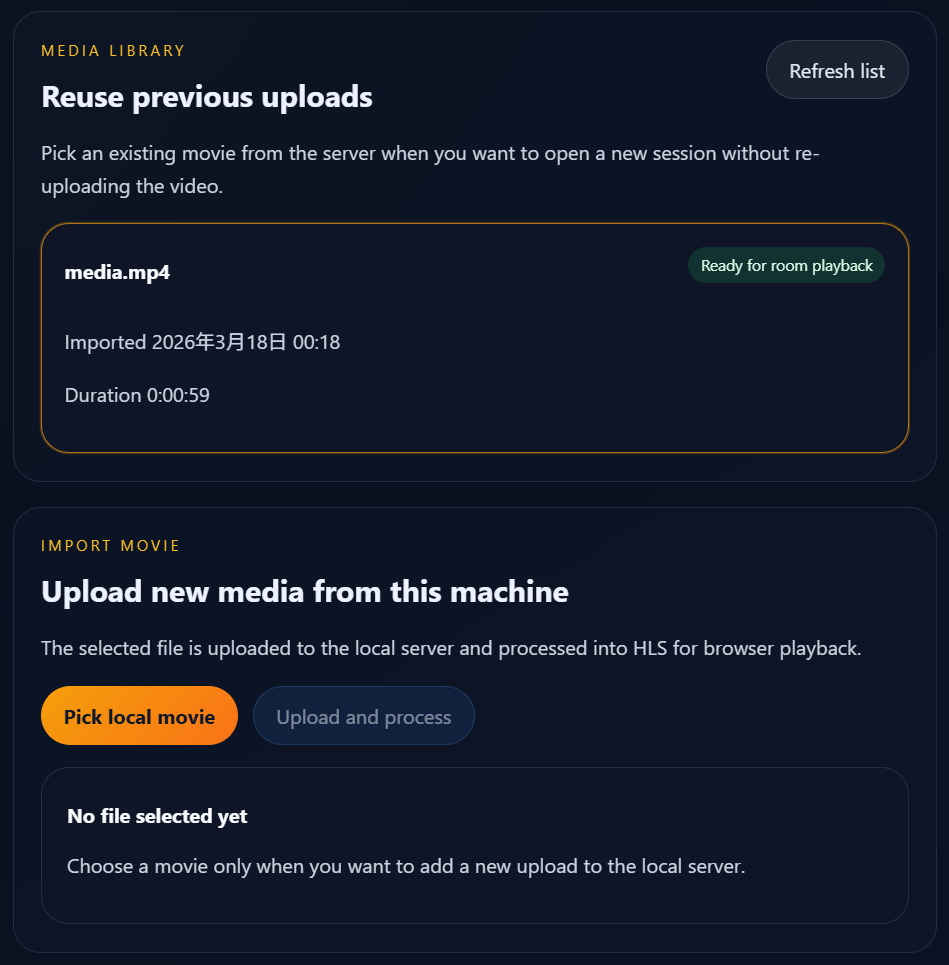
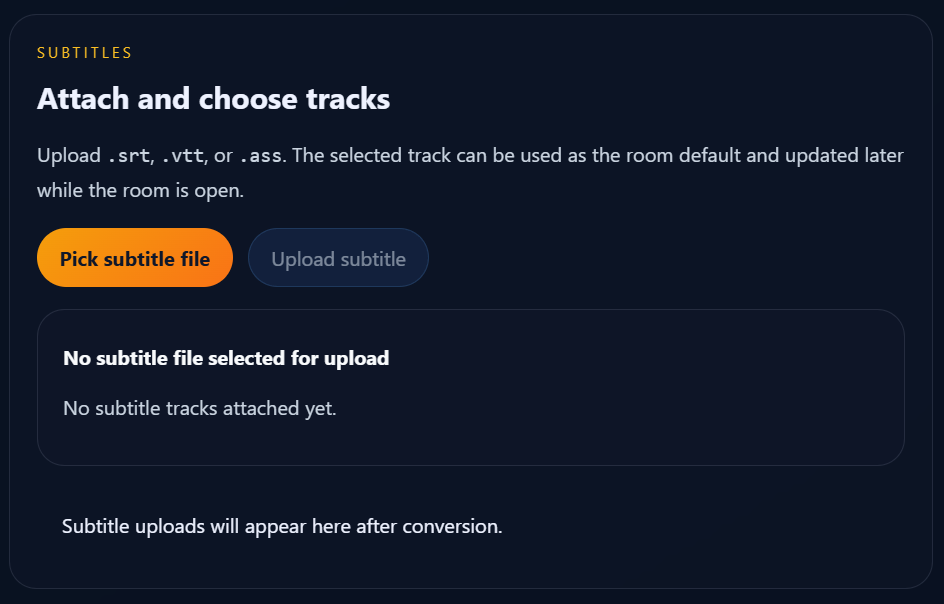
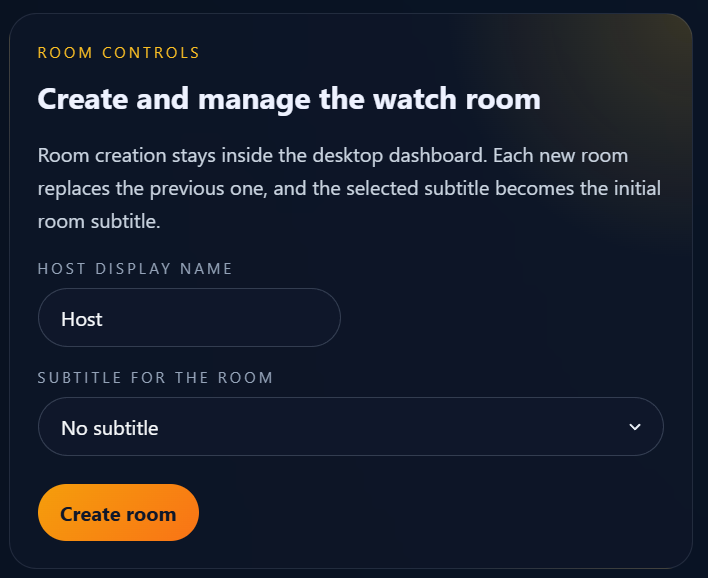
You can create a room and share the room link
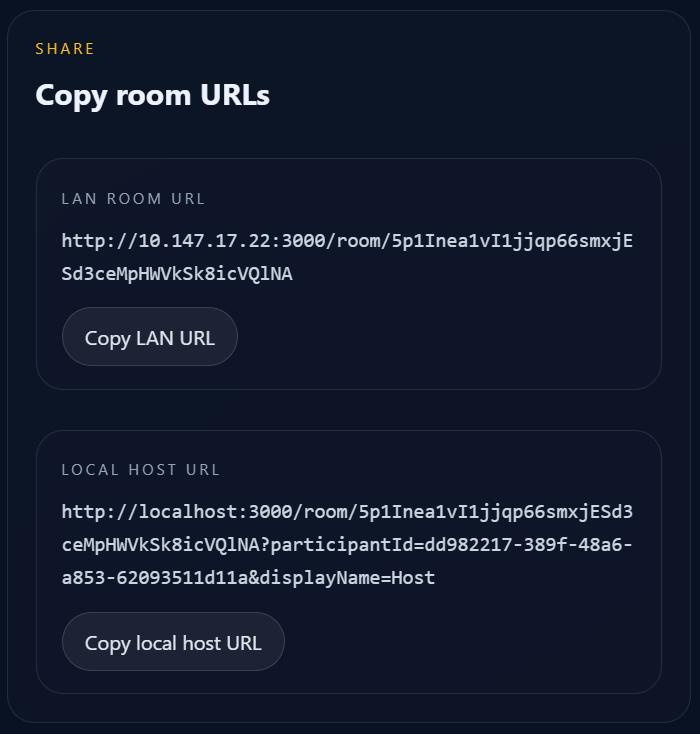
Share the LAN Room URL with your friend, open the Local Host URL yourself, and you can happily watch movies together~ During the movie, any action of pausing, playing, or dragging the progress bar by either party will be synchronized to the other, so even if you are in different places, you can immersively watch movies together.
Environment Configuration
To implement the server’s functionalities and compile each component, we need to download some tools. Note that these tools only need to be downloaded by the Host; the Guest only needs to open the link~
Note: Some specific minor details of the configuration might be omitted here. It is highly recommended to pair this with the official README for a complete experience.
Node.js
My framework is generally built with TypeScript, so Node.js is required to run this framework. Downloading Node.js is very simple, here are several ways:
- Download from the official website: Recommended for general users
- Download using FNM: Recommended for professional users
NPM
NPM is the package manager for Node.js, which can help you download and manage external packages and tools provided by the community. Downloading is very simple, you can download it directly from the official website.
FFMPEG
FFMPEG is an open-source media processing tool used by many multimedia processing software we encounter daily. Downloading is very simple, just download from the official website, and don’t forget to configure the environment variables after downloading!
Rust Build Environment
VideoTogether’s desktop component is implemented in the Rust language, so the Rust compilation toolchain is required to build it. You can just download it directly from the official website.
Usage Tips
In practice, sharp-eyed friends might notice that the link we generate is only an intranet IP (like 10.147.x.x, etc.), not a public IP. Students who listened carefully in middle school computer class might ask: Do two people have to be squeezed into the same local area network and connected to the same router to use VideoTogether?
Of course not! We only need to use ZeroTier to easily set up a P2P virtual local area network. This allows you to securely and stably bridge physical distances, enabling you to directly connect to your computer through this virtual massive network, even if you are thousands of miles apart!
Gemini Says
The “House Number” and “Cubicle” of the Interconnected World: Public IPs and Intranet Resolution
In the vast ocean of the Internet, every device that wants to communicate must have an identity. We can understand the relationship between Public IP and Intranet through a simple analogy.
1. Public IP: The Globally Unique “Building Address”
A Public IP is like a real, globally unique street house number (e.g., No. 100 Chang’an Avenue). No matter which corner of the world you are in, as long as you dial this address, data packets can accurately find the corresponding “building”. It is an address that can be directly routed by the Internet backbone, representing the device’s direct presence in the wide area network.
2. Intranet: The “Room Number” Inside the Building
The Intranet (LAN) is like the office number inside the building (e.g., Room 302).
- Every company (family, school) can have its own “Room 302”.
- These numbers are only meaningful internally, but if you stop a random person on the street and ask “Where is Room 302?”, they will be completely confused because they don’t know which building’s “302” you are referring to.
3. Why Can’t Intranet IPv4 be Directly Accessed from the Outside?
This stems from the scarcity of IPv4 address resources and the design of the NAT (Network Address Translation) mechanism. The core reasons are these three:
- Address Overlap (Ambiguity): There are hundreds of millions of intranets all over the world using the address
192.168.1.1. If you initiate a request on the WAN, how would the router distinguish which household’s “1.1” to send to?- Routing Barrier: The rule of core internet routers (ISPs) is to directly discard or ignore all private IP packets. Once these packets attempt to break through the router defense line into the public network, they will be ruthlessly annihilated.
- The “Mailroom” Mechanism of NAT: For an intranet minion to venture into the external network, it must rely on the router (NAT) to temporarily disguise it as a public IP. And for connection requests initiated from the outside, if “port forwarding” has not been set up in advance with the mailroom uncle, it is like a delivery guy arriving at the building entrance completely blind, not knowing which extension to deliver to; establishing a connection is naturally impossible.
Conclusion: The public IP is the unique business card, while the intranet IP is the internal code. The original intent of the intranet was to conserve IP resources while simultaneously wrapping internal devices in a natural “bumper”.
The above is the functional and usage tutorial for VideoTogether. Friends with a little computer experience can probably get it done in about 10 minutes, and complete beginners with zero experience can fully figure it out within an hour or two. If you encounter any problems, you can submit an issue on the project’s GitHub page or email me to ask.
Closing Thoughts
Perhaps some friends have already guessed, this project is one I Vibe Coded over two days, spending a dozen bucks, and every single line of code inside was completed by AI. I don’t even really know TypeScript and Rust!
Watching this solution run right before my eyes, I couldn’t help but fall into deep thought: If AI is already this fierce, what value will programmers have in the future? I think it can probably be summarized in the following points:
- Familiarity with computers. Configuring environments, designing tech stacks, choosing programming languages, designing software frameworks (although mine wasn’t designed very well actually), and even designing software functionalities, all these are inseparable from an understanding of computers.
- Programming design experience. Code style design and code reviews, these things that fundamentally determine how “far” a project can go, have become one of the most important capabilities in software development in this era.
- The ability to propose requirements. From functional design to UI design, this ability determines whether a software is useful.
These abilities are indeed the precious wealth left to me by my CS education, but they are not some hard-to-acquire innate talent. In other words, as long as anyone can acquire these abilities through learning, anyone can develop a software at almost zero cost, to solve one of their own problems, to help people around them, to change the world…